If you are choosing an interactive flat panel for a classroom, meeting room or training space, one question usually comes first:
Should I buy a 65-inch, 75-inch or 86-inch interactive flat panel?
The answer should not be based on the number of people in the room alone.
A room with 20 people may need a larger display than a room with 30 people if the room is deeper, the content contains small text or participants sit farther from the screen.
A better way to choose is to consider four factors: room depth + farthest viewing distance + content type + interaction requirements.
As a practical starting point:
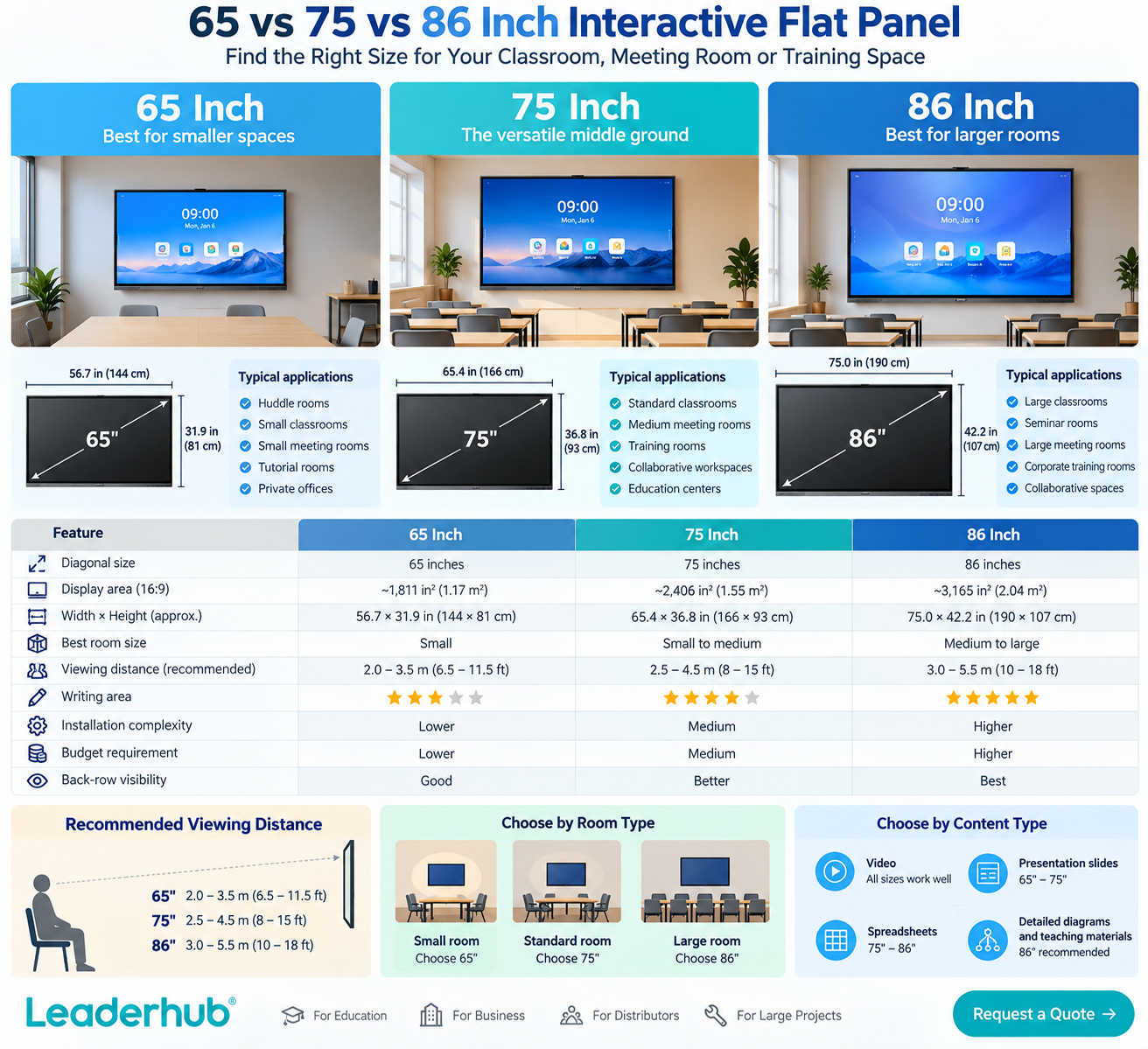
| Screen Size | Best Starting Point | Typical Applications |
| 65 inch | Smaller rooms and shorter viewing distances | Huddle rooms, small classrooms, small meeting rooms |
| 75 inch | Most standard classrooms and meeting rooms | Classrooms, conference rooms, training spaces |
| 86 inch | Larger or deeper rooms | Large classrooms, seminar rooms, larger meeting rooms |
If you are uncertain between two sizes, first look at the person sitting farthest from the screen—not the person standing in front of it.
Why Interactive Flat Panel Size Matters
A larger interactive display gives you more than a bigger picture. It affects text readability, visibility from the back of the room, writing area, collaboration space, installation requirements, wall space, product weight and budget.
Choosing a screen that is too small creates a simple problem: people cannot comfortably read the content.
Choosing one that is unnecessarily large creates different problems: higher cost, more difficult installation and potentially poor fit within the room.
The goal is therefore not to choose the biggest panel. The goal is to choose the smallest size that comfortably serves every viewer and user in the space.
How Big Are 65, 75 and 86 Inch Interactive Flat Panels?
Screen size is measured diagonally rather than horizontally.
For a standard 16:9 display, the approximate active display dimensions are:
| Diagonal Size | Approx. Width | Approx. Height |
| 65 inch | 56.7 in / 144 cm | 31.9 in / 81 cm |
| 75 inch | 65.4 in / 166 cm | 36.8 in / 93 cm |
| 86 inch | 75.0 in / 190 cm | 42.2 in / 107 cm |

65-Inch Interactive Flat Panel: Best for Smaller Spaces
A 65-inch interactive flat panel is usually the most practical choice when users are relatively close to the screen.
Typical applications include:
- Huddle rooms
- Small meeting rooms
- Smaller classrooms
- Tutorial rooms
- Small training spaces
- Private offices
Advantages of a 65-inch interactive flat panel
1. Lower project cost
65-inch models typically require less investment than larger versions in the same product series. For projects covering many smaller rooms, this difference can significantly affect the total budget.
2. Easier installation
A smaller screen generally means lower product weight, easier handling, easier transportation and less wall space required. This can be particularly useful when retrofitting existing rooms.
3. Comfortable for close-range interaction
If teachers or meeting participants spend a lot of time writing directly on the display, a 65-inch surface can feel natural in a compact room.
When is 65 inches too small?
A 65-inch panel may not be ideal if:
- The room is relatively deep
- The back row is far from the screen
- Small text is frequently displayed
- Several people need to view detailed content simultaneously
- The screen will display complex spreadsheets or diagrams
The panel itself may still be perfectly sharp, but viewers can struggle to read the content because it appears physically too small from a distance.
75-Inch Interactive Flat Panel: The Versatile Middle Ground
For many schools and businesses, 75 inches is the most flexible size to evaluate first.
It offers noticeably more screen area than 65 inches while remaining easier to install than an 86-inch display.
Typical applications include:
- Standard classrooms
- Medium-sized conference rooms
- Training rooms
- Collaborative workspaces
- Education centers
- Team meeting rooms
Why 75 inches works well in many environments
1. Better visibility without becoming oversized
A 75-inch panel gives people sitting farther away a larger image while remaining suitable for normal classroom and meeting-room layouts.
2. More writing space
Interactive flat panels are not passive displays. Teachers and teams frequently use them for whiteboarding, annotation, brainstorming, diagrams and mind maps.
The additional surface area becomes particularly valuable when several ideas need to remain visible at the same time.
3. Good balance between cost and usability
For organizations standardizing displays across multiple locations, 75 inches can offer a useful compromise between visibility, installation and budget. This is why the 75-inch category is often attractive for multi-room deployments.
When should you move beyond 75 inches?
Consider an 86-inch display when:
- The room is long
- People in the back frequently read text
- Classroom materials contain detailed diagrams
- Multiple windows are displayed simultaneously
- More writing surface is needed
- Presentations regularly involve larger audiences
86-Inch Interactive Flat Panel: Best for Larger Rooms
An 86-inch interactive flat panel provides a significantly larger visual and collaborative workspace.
Typical applications include:
- Large classrooms
- University teaching spaces
- Seminar rooms
- Large conference rooms
- Corporate training rooms
- Collaborative project spaces
Advantages of an 86-inch interactive flat panel
1. Better visibility at longer distances
For a viewer at the back of a larger classroom, the difference between 65 and 86 inches can be significant. Larger text and graphics improve readability without requiring presenters to constantly enlarge documents.
2. More space for detailed content
An 86-inch display is particularly useful for content such as:
- Engineering drawings
- Educational diagrams
- Data dashboards
- Spreadsheets
- Maps
- Multiple documents
- Split-screen collaboration
3. Larger collaborative workspace
When several users work at the panel simultaneously, additional physical screen area makes collaboration more comfortable. This is useful for group exercises, workshops and team planning.
What should you consider before buying an 86-inch panel?
Bigger also means more demanding installation. Check:
- Wall structure
- Mounting system
- Door access
- Elevator dimensions
- Delivery route
- Installation labor
- Screen height
- Power and network positions
An 86-inch panel should be planned as part of the room rather than treated like a large television that can simply be added later.
65 vs 75 vs 86 Inch: Side-by-Side Comparison
| Factor | 65 Inch | 75 Inch | 86 Inch |
| Small rooms | Excellent | Good | Often unnecessary |
| Standard classrooms | Possible | Excellent | Excellent where room is deeper |
| Large classrooms | Limited | Good | Excellent |
| Small meeting rooms | Excellent | Good | Usually oversized |
| Medium meeting rooms | Good | Excellent | Excellent |
| Large meeting rooms | Limited | Good | Excellent |
| Writing area | Good | Very good | Excellent |
| Installation complexity | Lower | Medium | Higher |
| Budget requirement | Lower | Medium | Higher |
| Back-row visibility | Lower | Better | Best of the three |
Which Size Is Best for a Classroom?
For schools, use the following framework.
Choose 65 inches when:
- The classroom is relatively small
- Students sit close to the board
- Budget efficiency is a major priority
- The panel mainly supports a smaller group
Choose 75 inches when:
- The room is a typical classroom
- The school wants a balance between visibility and cost
- Teachers regularly annotate content
- The panel needs to support a broad range of lessons
Choose 86 inches when:
- The classroom is larger or deeper
- Back-row visibility is important
- Detailed teaching materials are common
- Multiple students interact with the panel
- The screen will support long-term classroom standardization
For large education projects, it may make sense to standardize different sizes by classroom type rather than purchasing the same size for every room.
For example: smaller classrooms → 65 inch; standard classrooms → 75 inch; larger classrooms → 86 inch.
This can improve both usability and budget efficiency.
Which Size Is Best for a Meeting Room?
The same logic applies in business environments.
65 inch
- Huddle rooms
- Small conference rooms
- Small teams
75 inch
- Standard meeting rooms
- Medium conference spaces
- Training rooms
86 inch
- Large meeting rooms
- Boardrooms
- Training spaces
- Rooms displaying data-heavy content
For video conferencing, also consider camera position. As displays become wider, placing the camera too far above the screen can create an unnatural viewing angle. The full AV system should therefore be planned together.
A Simple Interactive Flat Panel Size Checklist
- What is the room depth?
- How far is the farthest viewer?
- What content will usually be displayed?
- How small is the text?
- How many people will actively use the touchscreen?
- Is the panel wall-mounted or mobile?
- Can the wall support the selected model?
- Will children need to reach the screen?
- Is the project being standardized across multiple room types?
- What is the total installation budget?
If you answer these questions first, the correct screen size usually becomes much easier to identify.
Leaderhub 65, 75 and 86 Inch Interactive Flat Panels
Leaderhub offers interactive flat panel options across the commonly used 65-inch, 75-inch and 86-inch categories.
For example, Leaderhub’s ZM and HM series include multiple size options designed for classrooms, meeting rooms and collaborative environments.
This allows schools, enterprises, distributors and project partners to choose screen sizes based on the room rather than forcing every application into one product configuration.
For large projects, Leaderhub can also help evaluate factors such as room type, screen size, product configuration, installation requirements and deployment scale.
Need help choosing the right interactive flat panel size?
Contact Leaderhub with your room dimensions, application and project quantity. Our team can recommend a suitable configuration for classrooms, meeting rooms, distribution projects and large-scale deployments.