
Best Smart Board for Preschool Classroom Interactive Learning Tools
Empower early childhood educators and inspire young minds with cutting-edge, safe, and intuitive interactive flat panels. Discover how Leaderhub transforms traditional playgroups into immersive, collaborative learning spaces.
The Digital Transformation of Early Childhood Education
Why a dedicated smart board for preschool classroom setups is no longer just a luxury, but a foundational tool for cognitive and physical development.
In the modern early childhood education landscape, traditional blackboards and static posters are giving way to dynamic, interactive ecosystems. Integrating a smart board for preschool classroom environments bridges the gap between tactile play and visual learning. Toddlers and young learners process information primarily through multi-sensory experiences; interactive flat panels cater perfectly to this need by combining vibrant colors, audio feedback, and physical touch.
Unlike passive screen time, which parents and educators rightfully limit, interactive smartboards encourage active participation. Children don’t just watch; they drag, drop, draw, write, and collaborate with their peers. This collaborative environment fosters essential social skills, turn-taking, and fine motor control from a very young age.
Leaderhub’s advanced interactive whiteboards are engineered with these pedagogical needs in mind. With ultra-responsive multi-touch technology, safe eye-care displays, and sturdy mobile configurations, we provide the ultimate interactive tools that withstand the energetic dynamics of a preschool classroom.

Key Features of the Perfect Preschool Smart Board
Eye Protection Technology
Preschoolers have developing eyes sensitive to bright light. Look for anti-glare, flicker-free screens with certified low blue light emissions to ensure long-term visual health during interactive lessons.
High Durability & Safety
Preschool environments can be chaotic. Tempered glass (7H or 9H hardness) is essential to prevent scratches and shattering. Rounded corners and robust frames prevent injuries during active play.
Intuitive Multi-Touch
Children naturally interact using their hands. A board supporting 20+ points of touch allows multiple students to write, draw, or play games simultaneously, promoting collaborative skills.
Cloud & App Integration
Direct access to educational platforms, interactive storybooks, and gamified math programs via Android or Windows interfaces makes lesson planning easy for teachers.
Recommended Leaderhub Smart Boards for Preschool Classrooms
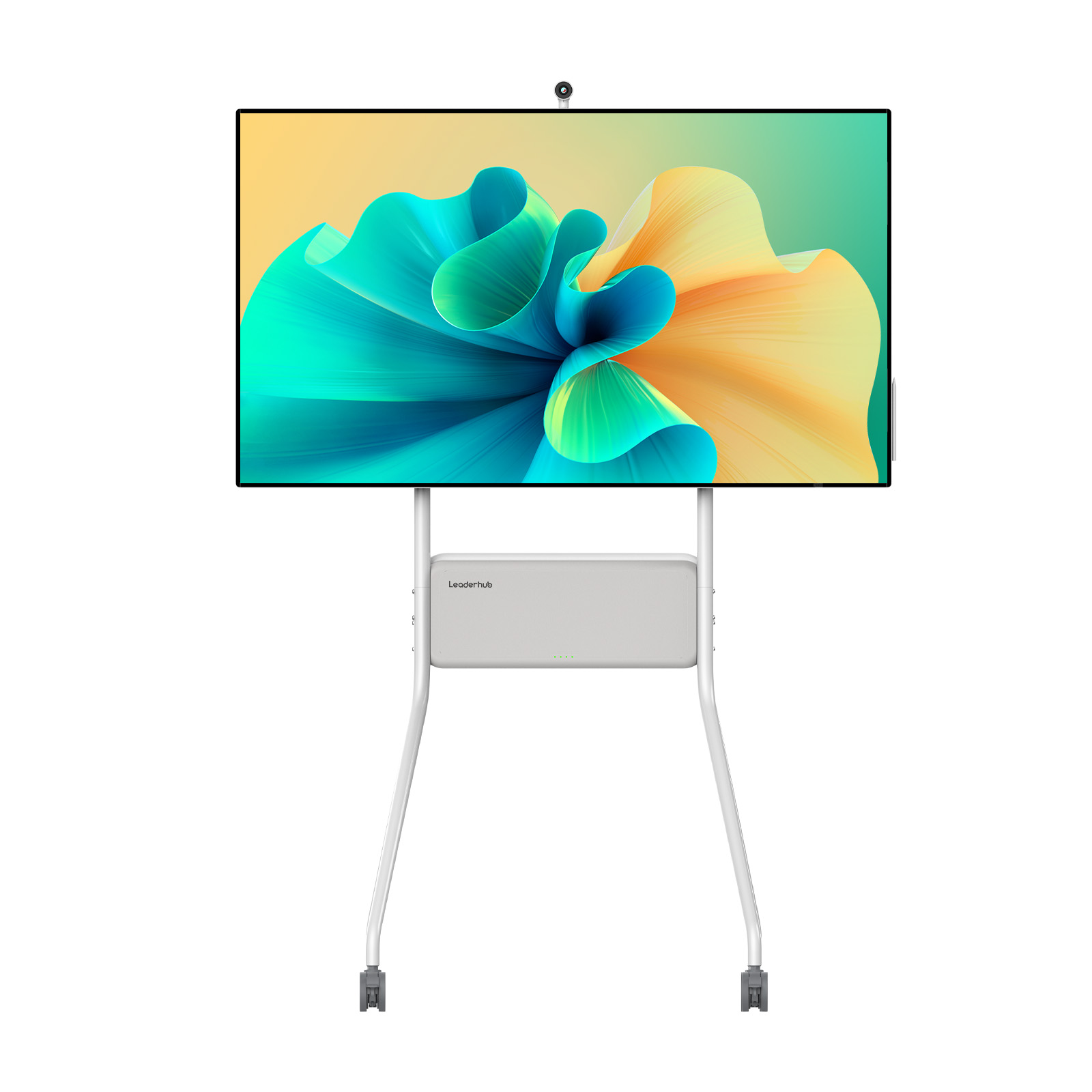
Leaderhub U55Pro Interactive Flat Panel — 55″ Mobile 4K Smart Display

Leaderhub L65HM Interactive Smart Whiteboard — 65″ 4K Touchscreen
Leaderhub L75HM Interactive Smart Whiteboard — 75″ 4K Touchscreen
Compare Top Smart Boards for Preschool Classrooms
| Model Name | Screen Size | Best Suited For | Key Safety Features | Price |
|---|---|---|---|---|
| Leaderhub U55Pro | 55 Inch | Multi-classroom sharing, flexible heights | Mobile stand, rounded casing, battery powered | $2,499.00 |
| Leaderhub L65HM | 65 Inch | Standard classrooms, wall-mount setups | Anti-glare 4K glass, low blue light | $1,299.00 |
| Leaderhub L75HM | 75 Inch | Large classrooms, interactive group games | Tempered safety glass, eye protection | $1,599.00 |
| Leaderhub L86HM | 86 Inch | Open-plan activity centers, shared halls | Heavy-duty build, shatterproof glass | $3,199.00 |
How Smart Boards Enhance Early Learning Curriculum
- 1. Visual & Auditory Stimulation For toddlers, learning is sensory. Animated phonics, interactive color-matching games, and sound effects make abstract concepts tangible and memorable.
- 2. Fine Motor Skill Development Using digital pens or fingers to trace letters, draw shapes, and move puzzle pieces helps children develop spatial awareness and hand-eye coordination.
- 3. Inclusive and Accessible Learning Smart boards can easily scale text sizes, project high-contrast visuals, and play audio descriptions, ensuring children with different learning styles and abilities are included.
- 4. Social-Emotional Growth By working in small groups at the board, preschool children learn to share, collaborate, converse, and celebrate collective achievements, building emotional resilience.
Practical Classroom Integration Ideas
Integrating a smart board into a preschool routine should be seamless and natural. Here are four practical ways teachers can incorporate Leaderhub interactive displays into daily schedules without overwhelming young students.
Interactive Storytime
Replace physical picture books with large-format digital storybooks. Zoom in on characters, tap objects to reveal hidden animations, and play ambient soundscapes to make reading magical.
Gamified STEM Foundations
Introduce basic math, pattern matching, and gravity physics through interactive puzzles. Dragging colorful shapes into correct slots keeps kids engaged longer than worksheets.
Virtual Field Trips
Bring the world to the classroom. Explore underwater coral reefs, safari parks, or outer space in 4K resolution, stimulating curiosity and vocabulary development.
Physical Movement Breaks
Use the board to display guided dance, yoga, or coordination videos. Children stand up, mimic the actions on screen, and burn off energy productively.
About Leaderhub
AI Changes Life
Leaderhub is a Shenzhen-based technology company with 16 years of professional experience in the interactive panel industry. We specialize in smart whiteboards, interactive flat panels, mini PCs, and portable smart screens — delivering innovative solutions to education, enterprise, and creative professionals in 82 countries worldwide.




Frequently Asked Questions
Q. Are smart boards safe for preschool children’s eyes?
Yes. Leaderhub smart boards feature advanced anti-glare technology and eye-protection filters that reduce harmful blue light emissions. This ensures that even during active lessons, children’s developing eyes are protected from strain and fatigue.
Q. Can children scratch or damage the screen?
Our interactive panels are built with high-durability, toughened glass (7H hardness scale). This makes them highly resistant to scratches, light impacts, and aggressive tapping from young learners using plastic pens, toys, or fingernails.
Q. Which size is best for a standard preschool classroom?
For standard classrooms (approx. 15-20 students), the 65-inch (L65HM) or 75-inch (L75HM) models are recommended. If mobility is crucial, the U55Pro (55-inch mobile screen) features a built-in stand and battery, allowing teachers to easily adjust screen heights and move the display.
Q. How do teachers load educational apps on the board?
Leaderhub smart boards run on Android and compatible Windows OS systems. Teachers can download educational apps, interactive stories, and gamified learning platforms directly from the app store or connect their personal devices via screen mirroring.
Ready to Upgrade Your Preschool Classroom?
Empower your educators with the ultimate interactive learning tools. Get in touch with our team today to find the perfect smart board solution for your early childhood learning center.
